
Email List View
- QuickEasy BOS includes features to send emails.
- Forms (e.g. Customer Invoices and Statements) can be emailed directly from the transactions or reports.
- The email subject lines and content can be customised to include personalisation and other features.
- Once set up, documents can be emailed from the screens on which they are viewed by clicking Output (button). These emails are placed in the Outbox, from where they can be edited or sent.
- Emails is a menu option that can be added to any menu.
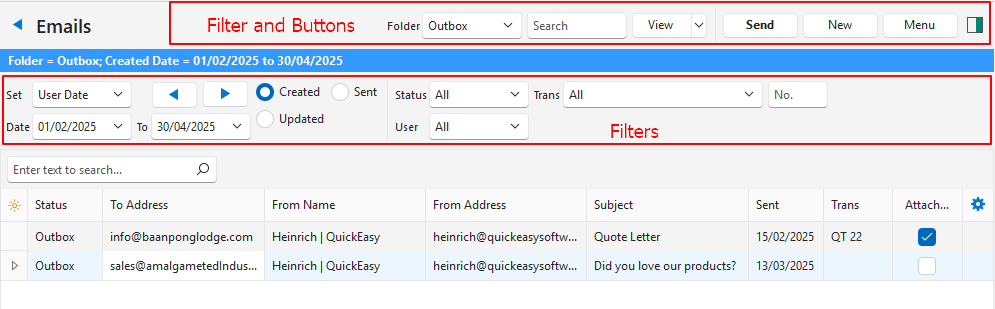
Buttons Explained
| Button | Description |
|---|---|
| Folder Dropdown List | Navigate to the various email folders:
|
| Search | A search bar for you to search for a particular email. |
| View (button) | Lists the emails that match the selected filters. |
| View (button arrow) | Reset Data Filter: Resets the filters. |
| Send | Sends the emails that are in the Outbox. The date and time each email is sent is recorded in the Sent column.
|
| New | Creates an email. |
| Menu |
|
Filters Explained
| Filter | Description |
|---|---|
| Set | Select a date option (e.g. Today, This Month) or select No Date to see all the emails. |
| Arrows | Adjusts the date fields in the direction of the arrow. |
| Date | Select a start and end date to refine the date selection. |
| Created | Radio button that works with the date field. Shows emails Created on the selected date. |
| Sent | Radio button that works with the date field. Shows emails Sent on the selected date. |
| Updated | Radio button that works with the date field. Shows emails Updated on the selected date. |
| Status | Select a specific status (or All). |
| Trans | Select a Transaction Type to show only the emails created from it (or All). |
| No. | Enter a specific document number (e.g. Quotation number) to find emails created for that document. |
| User | Select a user to show only the emails they created (or All). |
Fields Explained
| Field | Description |
|---|---|
| Field Chooser (*) | Add or remove columns. |
| ID | A system-generated number for the email. |
| Status | The status of the email. |
| To Address | The email address of the person the email is sent to. |
| CC Address | The email address of the person the email must be copied to. |
| BCC Address | The email address of the person the email must be blind copied to (sent without exposing the recipient’s email address). |
| From Name | The user sending the email. |
| From Address | The user’s email address. |
| Subject | The email’s subject. |
| Sent | The date on which the email was sent. |
| Trans | The transaction from which the email was generated. |
| Attachment | A checkbox that shows whether the email contains an attachment. |
| Updated By | The user who updated the email. |
| Created | The date on which the email was created. |
| @ | The time when the email was created. |
| Updated | The date on which the email was updated. |
| @ | The time when the email was updated. |
| Context Menu | Lets you Edit or Delete the email. |