Inventory and Transaction Types
QuickEasy BOS includes a scalable inventory system. As the system is developed or features are requested, the Inventory module will be expanded to provide more complex inventory management tools.
The inventory system relies on Entities, Items and Transactions to work.
Resolve Explained
- The Resolve option indicates how the Stock Item on the transaction is processed.
- The options are:
- Purchase: The inventory must be purchased. This resolve is used for copying transactions and does not affect inventory.
- Produce: The inventory must be produced. This resolve is used for copying transactions and does not affect inventory.
- Reserve: The inventory is reserved for an order (e.g. Sales Orders).
- Issue: The inventory is issued to a job or customer (e.g. Work Orders, Sales Orders, Customer Invoices).
- On Order: The inventory is ordered but not yet received (e.g. Purchase Orders, Work Orders).
- Receive: The inventory is received (e.g. Supplier Invoices, Work Orders).
- For example:
- On a Sales Order, you could select:
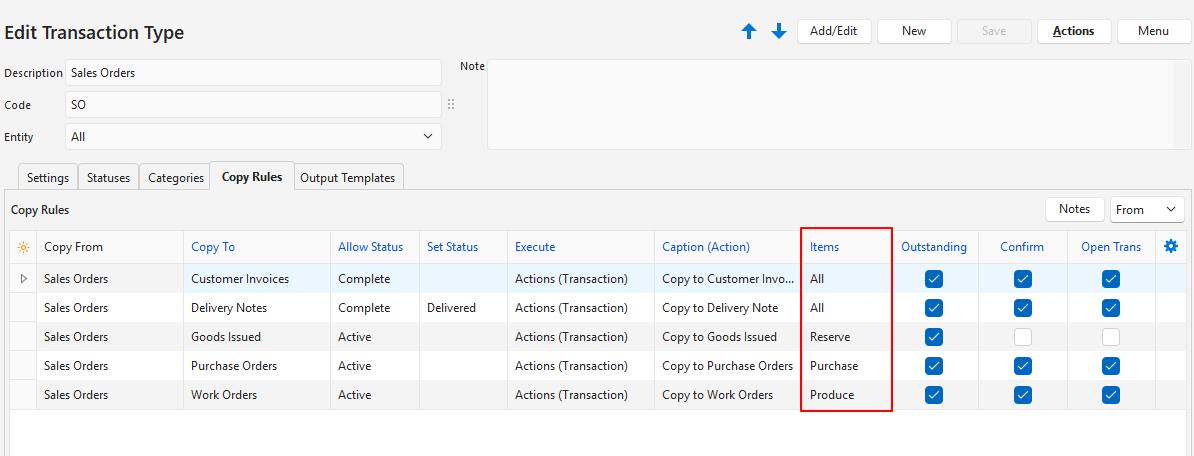
- Purchase to ensure the correct items are copied to a Purchase Order.
- Produce to ensure the correct items are copied to a Work Order.
- Reserve to reserve the stock item if there is stock on hand.
- On a Purchase Order or Work Order, you could select:
- On Order to indicate that the stock is on its way.
- On a Sales Order, you could select:
Temporary and Permanent Resolves
- Reserve:
- Reserve is a temporary resolve.
- Reserve alerts managers that the stock is needed for a specific order.
- Once the stock is issued, the Reserve hold must be cancelled.
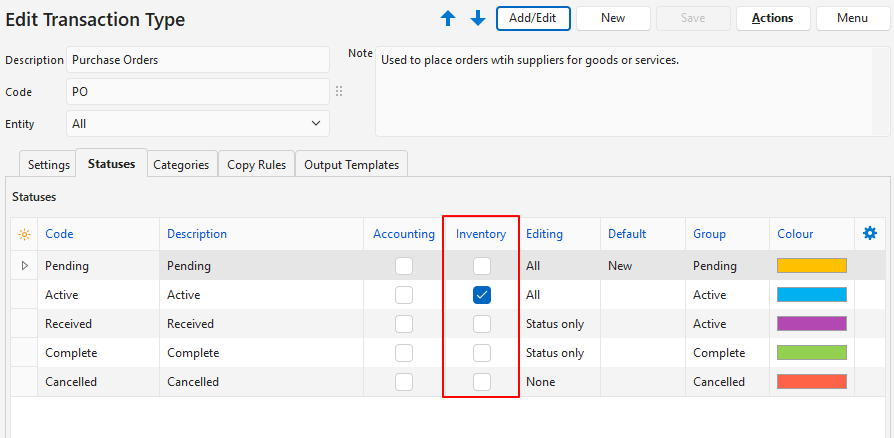
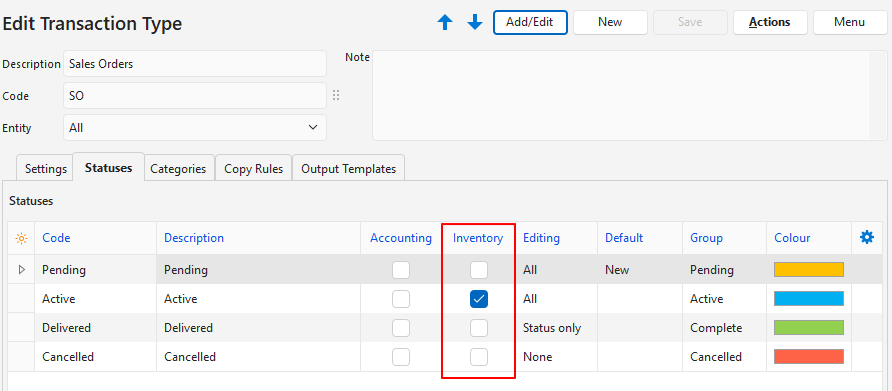
- To do this, create a Transaction Type that only affects inventory when it is active and not when it is complete. For example:
- On Order:
- On Order is a temporary resolve.
- It alerts managers that the stock is ordered.
- Once the stock is received, the On Order alert must be cancelled.
- To do this, create a Transaction Type that only affects inventory when it is active and not when it is complete. For example:
- Issue and Receive:
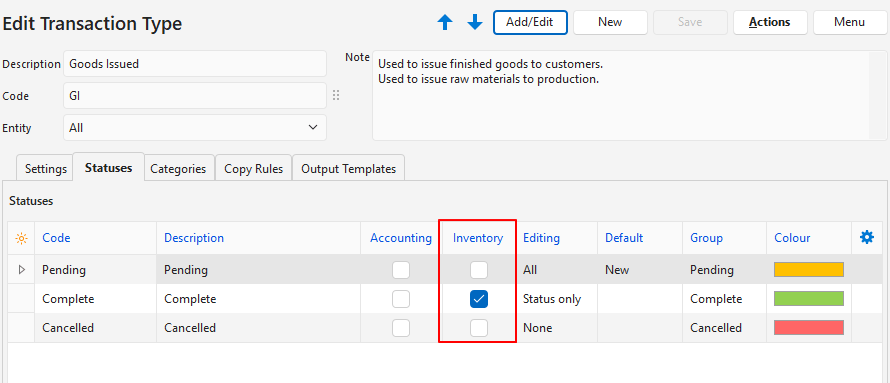
- Issue and Receive are permanent resolves because their effect on stock is final.
- They should affect inventory only when the transaction is complete.
Stock Movements
You can create transactions to control inventory movements. Follow these guidelines when you create and use them:
- The Resolve option indicates how stock is updated. A stock movement Transaction Type should be created for every resolve option.
- Issue: Stock is reduced (e.g. Goods Issued, after stock is issued to a customer).
- Receive: Stock is increased (e.g. Goods Received, from a Supplier Invoice).
- Stock Adjustment: Stock quantities are increased or decreased in the system to match the counted physical stock. A Transaction Type setting manages this, not a resolve.
- Stock movement transactions should always use the local currency.
- Prices are updated as follows:
- Issue: Inventory Price.
- Receive: Supplier Price (from a Purchase Order) or Production Costs (from a Work Order).
Transaction Types and Inventory: Basic
- Organisations that purchase goods for resale could create Transaction Types with the applicable Copy Rules as shown below.
- The Resolve options in bold affect inventory.
- The Resolve options in grey do not affect inventory.
Transaction Types and Inventory: Complex
- Organisations may create Transaction Types with the applicable Copy Rules in the more complex structure shown below.
- The Resolve options are in bold.
- The Resolve options in grey do not affect inventory.
- The two boxes with a dashed border and grey italic text are explanations.
- Organisations may create extra Transaction Types to record internal stock movements (e.g. Stock Transfers from the factory to the warehouse).
- An additional Goods Issued transaction may be needed to issue raw materials to production.
Recommended Transaction Type Settings
- The Inventory column on the statuses determines whether the transaction counts when inventory is calculated.
- If a transaction is in an Inventory Status, the inventory is adjusted according to the Resolve options.
- Resolve options also help with copying transactions and make sure that items are copied to the applicable transactions.
| Transaction Type | Status: Inventory Column | Status: Inventory Column Explanation | Resolve Options | Resolve Explanation |
|---|---|---|---|---|
| Quotation | n/a | Processing only starts when Quotations are copied to another transaction (e.g. Sales Order). | n/a | Processing only starts when Quotations are copied to another transaction (e.g. Sales Order). |
Customer Invoices / Delivery Notes No Goods Issued transaction | Checked for Active and Complete. | When the stock is issued to a customer, it must be removed from stock. The column can be checked for either the invoice or the delivery note, but not both. | Issue | The Issue resolve shows that the stock is issued to a customer. The quantity is subtracted from stock on hand. The resolve must be set for either the invoice or the delivery note (as chosen under the Status options), but not both. |
Customer Invoices / Delivery Notes Copied to or from a Goods Issued transaction | n/a | Inventory is managed by the Goods Issued transaction. | n/a | Inventory is managed by the Goods Issued transaction. |
| Sales Order | Checked for Active only. | Inventory is only checked when the Sales Order is Active. When the Sales Order is Complete, it should no longer affect inventory. | Item is in stock = Reserve Item must be made = Produce Item must be purchased = Purchase | The stock on hand must be reserved so that it is booked for the order. The Produce and Purchase resolves do not affect inventory. They help with Copy Rules so that the correct items are copied to the correct transaction. |
| Purchase Order | Checked for Active only. | When the stock is received, the Purchase Order should be marked complete and should no longer affect inventory. | On Order | The On Order resolve shows that stock is ordered. |
| Work Order | Checked for Active only. | When the stock (materials) is ready, the Work Order should be marked complete and should no longer affect inventory. | On Order | The On Order resolve shows that stock is being manufactured. |
Supplier Invoice No Goods Received transaction | Checked for Active and Complete. | It depends on how you use the Active and Complete statuses internally. The Inventory column should be checked for all statuses where the transaction is certain (that is, the stock has arrived). | Receive | The Receive resolve shows that stock is received. The quantity is added to stock on hand. |
Supplier Invoice Copied to or from a Goods Received transaction | n/a | Inventory is managed by the Goods Received transaction. | n/a | Inventory is managed by the Goods Received transaction. |
| Goods Issued | Checked for Complete. | When the stock is issued to a customer or Work Order, it must be removed from stock. | Issue | The Issue resolve shows that stock is issued to either production (Work Order) or a customer (Delivery Note or Invoice). The quantity is subtracted from stock on hand. |
| Goods Returned | Checked for Complete. | When the stock is returned, it must be added back to the stock on hand. Stock can be returned from Customers (finished goods rejected). Stock can be returned from Work Orders (unused Raw Materials or Finished Goods for future orders). | Receive | The Receive resolve shows that the stock is received. The quantity is added to the stock on hand. |
| Stock Adjustment | Checked for Complete. | The stock adjustments must be permanent. | n/a | A specific Transaction Type setting manages stock adjustment transactions. Resolves are not used. |
Copy Rules Example
This screenshot shows how the resolve options are used when copying Sales Orders.