
Trial Balance Interface
A Trial Balance lists all the accounts that have balances during a selected period. Its figures come from the Statement of Profit or Loss and the Statement of Financial Position, including the Retained Earnings (Retained Income), so the Trial Balance agrees with the statements.
The Retained Earnings (Retained Income) account shows the opening balance only: the profit from the revenue and expense accounts before the start of the selected period. The profit for the period itself appears in the revenue and expense accounts, so it is not counted twice and the Trial Balance balances for the financial year.
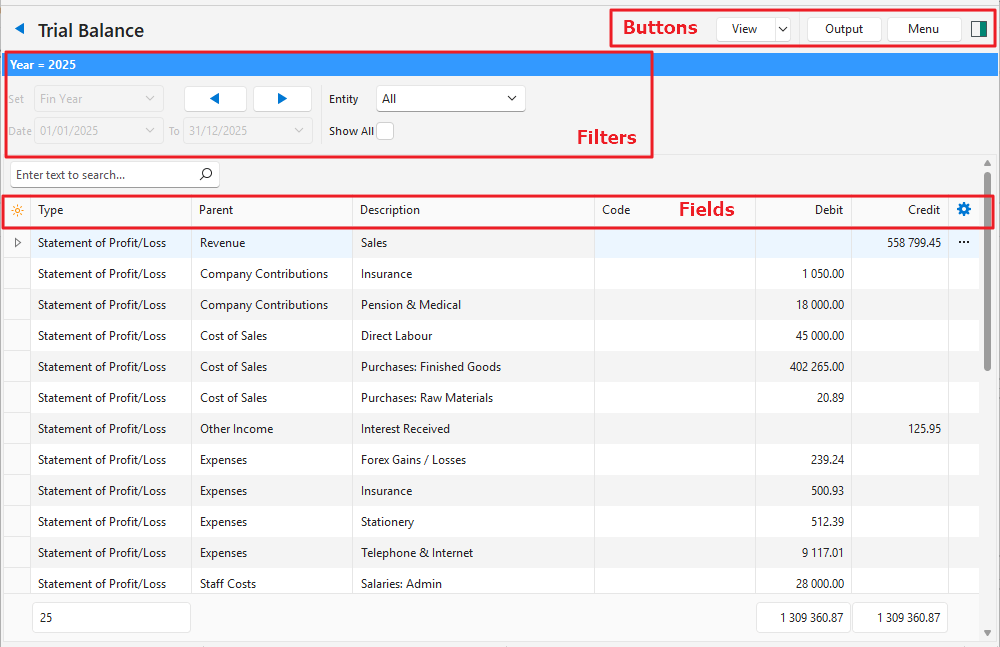
Buttons Explained
| Button | Description |
|---|---|
| View | Shows the entries that match the selected filters. |
| Arrow on View Button | Reset Data Filter: Resets all the data filters. |
| Output | Prints, previews or emails the output if Output Templates are set up for the module. Export: Exports the list in .xlsx, .htm or .csv format. |
| Menu | Views Settings
|
Filters Explained
| Filter | Description |
|---|---|
| Set | Fixed at Fin Year (the current financial year) and cannot be changed. |
| Arrows | Adjusts the date in the direction of the arrow. |
| Date … to … | Unavailable for the Trial Balance. |
| Entity | Select All or a specific entity from the dropdown list. |
| Show All | A checkbox. If checked, all the accounts appear, including those with zero balances. |
Fields Explained
| Field | Description |
|---|---|
| Field Chooser (*) | Add or remove columns. |
| ID | The system-generated number for the entry. |
| Type | The type of account: Statement of Profit/Loss or Statement of Financial Position. |
| Parent | The name of the account directly above the sub-account. |
| Description | The name of the account. |
| Code | The account number or code. |
| Debit | The account’s balance if it has a debit balance. |
| Credit | The account’s balance if it has a credit balance. |
| Balance | A read-only check field: the sum of all the account balances (debits less credits), which should be zero. Appears in red if it is not zero. |
 | A context menu (also opened by right-clicking the entry) with the following option:
|