
Item Extension Types
This page explains the extensions to the item types: what the built-in types add, and the features of each available type. The item types themselves are introduced on Item Creation and Editing Interface.
Item Types Explained
- To create an item, click the New button, then select an Item Type from the dropdown list.
- The type cannot be changed afterwards.
- If the wrong type is chosen, you must create a new item with the correct type. You can delete the item with the wrong type or change its status to Cancelled.
- By default, only Materials and Tasks are available. To add more types, use the general setting Items > Enable Item Types.
Built-in Types
- Add a fixed set of attributes and auto-generate the description from these Attribute values.
- Fixed attribute sets created by a built-in type cannot be removed or edited. Only the values can be changed.
- To edit the item’s auto-generated description, check the Override box.
- The attributes are also copied when you copy the item to create a new item.
- Attributes linked to fixed sets have negative IDs (you can show the IDs with Field Chooser (*)). Audit trails use the IDs to trace a change or entry.
- Add a fixed set of units.
- The base unit is automatically assigned and cannot be changed.
- The included units cannot be edited or deleted.
- You can add more units.
Available Types
- Materials
- Standard (MAT): A flexible item for general inventory or services.
- Substrate (Sheets) (SHT): An extension for sheets (e.g. those used in the printing industry).
- Substrate (Reels) (REL): An extension for reels (e.g. those used in the printing industry).
- Substrate (Square Metres) (SQM): An extension for surfaces (e.g. those used in the printing industry).
- Assembly (ASM): Adds a Costing tab where you select Materials, Tasks and Outwork to determine the cost of the assembly. This type is often used for nested Bills of Materials.
- Tasks
- Tasks (TSK): The labour component for production or manufacturing (e.g. finishing tasks).
- Outwork (OWK): The parts of production that are outsourced.
- Costing (CST): Adds a Costing tab where you select Materials (excluding Assemblies), Tasks and Outwork. This type is mainly used for Estimating.
Substrate (Sheets) Features
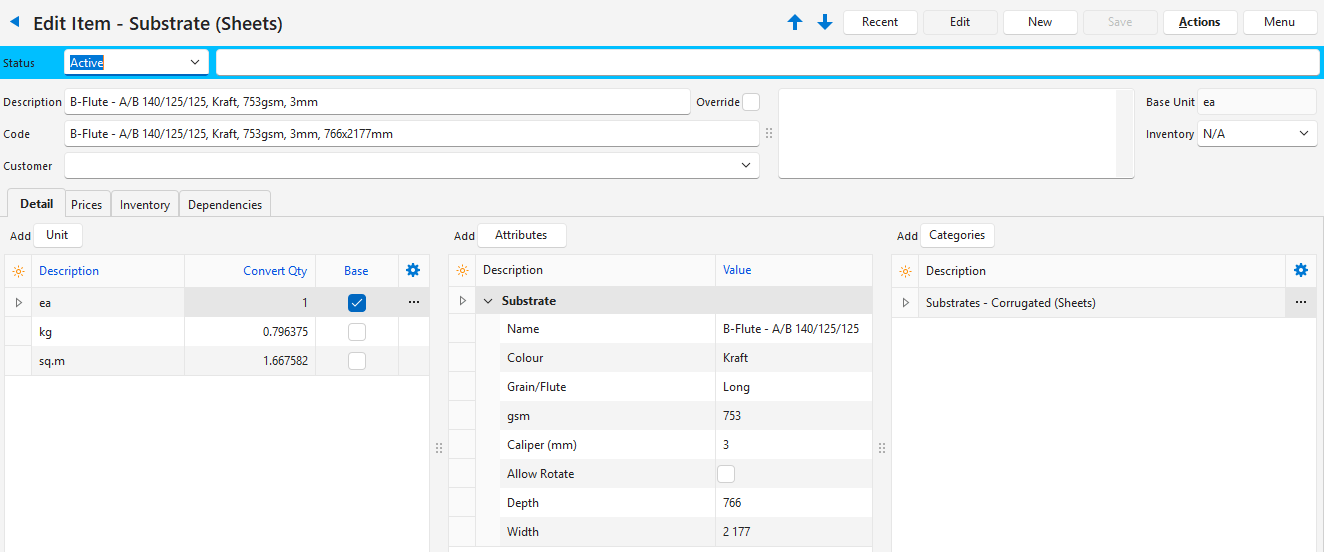
- The Description and Code are generated as follows:
- Code: Name, colour, gsm, calliper, size.
- Description: Name, colour, gsm, calliper.
- The base unit is fixed to ea (each sheet).
- The following Attributes are added:
- Attributes
- Name
- Colour
- Grain/Flute
- gsm (grams per square metre)
- Calliper (mm)
- Allow Rotate
- Size
- Depth
- Width
- Attributes
- The following Units are added:
- Base Unit: ea (each)
- kg (kilogram)
- sq.m (square metre)
Substrate (Reels) Features
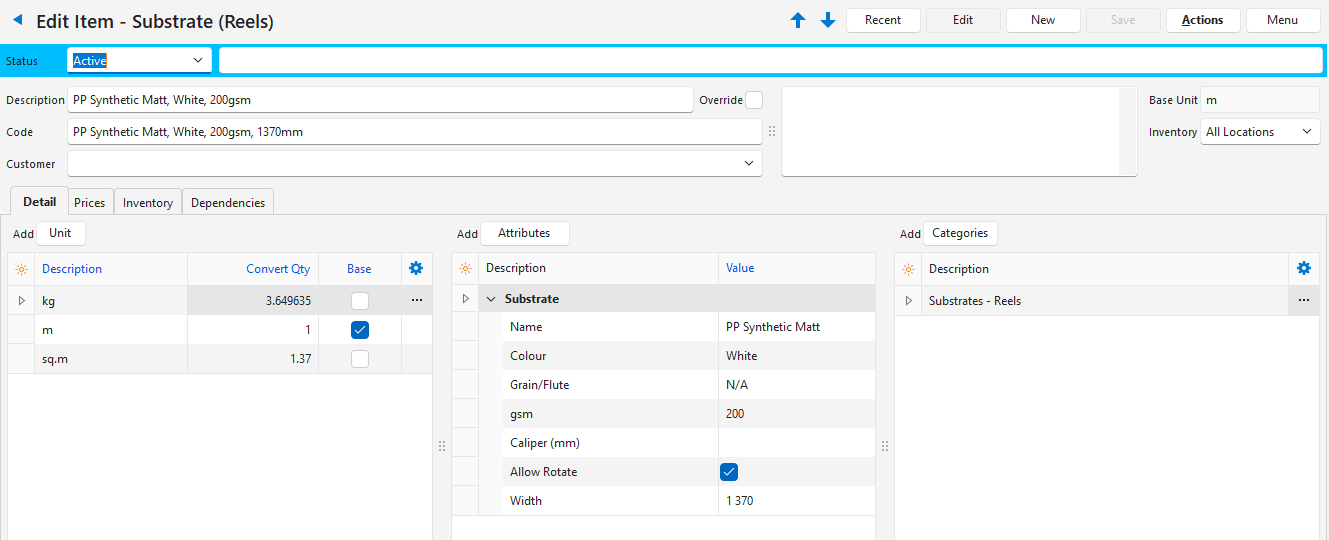
- The description is generated as follows: Name, colour, gsm, calliper, size.
- The base unit is fixed to m (metres).
- The following Attributes are added:
- Attributes
- Name
- Colour
- Grain/Flute
- gsm (grams per square metre)
- Calliper (mm)
- Allow Rotate
- Size
- Width
- Attributes
- The following Units are added:
- Base Unit: m (metre)
- kg (kilogram)
- sq.m (square metre)
- This item has the following Estimate features:
- It can be linked to a part.
- The quantity is updated from Tasks with an Imposition linked to the same part.
Substrate (Square Metres) Features
Info
Use this type for substrates that are priced per square metre in Estimating.
- The Description and Code are generated as follows:
- Code: Name, colour, gsm, calliper, size.
- Description: Name, colour, gsm, calliper.
- The base unit is fixed to sq.m (square metre).
- The following Attributes are added:
- Attributes
- Name
- Colour
- Grain/Flute
- gsm (grams per square metre)
- Calliper (mm)
- Allow Rotate
- Attributes
- The following Units are added:
- sq.m (square metre)
- This item has the following Estimate features:
- The quantity in square metres is calculated from the worksheet area of the part’s printing imposition. If the part has no printing imposition, the part area is used.
- The Setup (Units) of the item’s Substrate Waste attributes are setup worksheets. They are converted to square metres (the setup worksheets multiplied by the worksheet area, or by the part area if there is no printing imposition), and the Run% is added as waste.
- Quantities are not rounded up.
- The item is included in the job weight.
- The item can be selected in the Bill of Materials (BOM) of Costing and Assembly items.
- In the item edit view, Attributes (button) > Add lists the attribute sets for Substrate (Square Metres) items.
Tasks or Costings
Info
Tasks or Costing items can use Estimating (Printing) attributes.
These attributes add the following fields:
- Run Type: Select one of these types:
- Sheetwork
- Work & Turn
- Perfecting
- Plate Qty: Enter the number of plates needed to run the Task or Costing once on a part (e.g. printing CMYK on one side requires four plates).