
Currencies List View
This view shows all the currencies that can be used in transactions.
Overview
How currencies work in each module is explained on Currency Reference.
Before adding a currency, make sure it is activated by QuickEasy. Otherwise, no exchange rates are available.
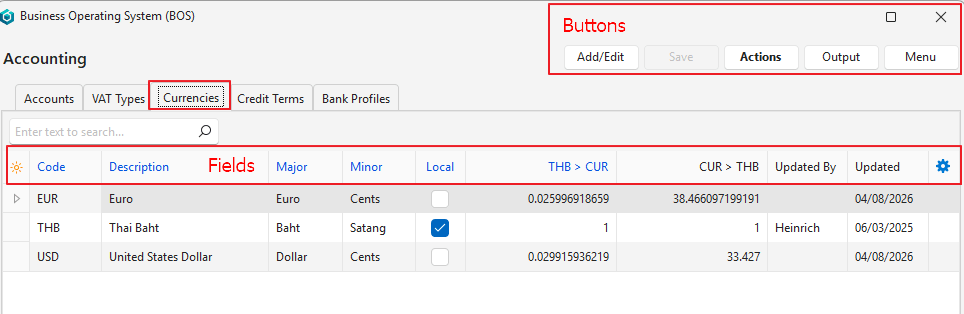
Buttons Explained
| Button | Description |
|---|---|
| Add/Edit | Adds a currency or edits the currencies. |
| Save | Saves any changes. |
| Actions | The options are:
|
| Output | Export: Exports the list in .xlsx, .htm or .csv format. |
| Menu | Layout |
Fields Explained
Fields marked in blue (✎) can be edited.
| Field | Description |
|---|---|
| Top Row | When you click Add/Edit (button), the top row becomes editable so that you can add a currency. |
| ID | A system-generated number for the currency. |
| Code | The internationally recognised code for the currency (e.g. EUR). |
| Description | The currency’s description (e.g. Euro). |
| Major | The name of the notes or major currency (e.g. Euros). This name is used to write the amounts in words on forms such as invoices. |
| Minor | The name of the coins or minor currency (e.g. Cents). This name is used to write the amounts in words on forms such as invoices. |
| Local | A checkbox. If checked, the currency becomes the local currency. Only one currency can be the local currency at any time. |
| Local Currency > CUR | The amount of foreign currency that one unit of the local currency can buy. |
| CUR > Local Currency | The amount of local currency that one unit of the foreign currency can buy. |
| Created | The date on which the currency was created. |
| @ (Time Created) | The time at which the currency was created. |
| Updated | The date on which the currency was last updated. |
| Updated By | The user who last updated the currency. Blank if the currency was updated automatically. |
| @ (Time Updated) | The time at which the currency was last updated. |
 | A context menu (also opened by right-clicking an entry). Lets you delete the currency if it is unused. A currency used in transactions or in item prices cannot be deleted: a “Delete Failed.” message names where it is used. |