
Transaction Categories Interface
Transaction categories are optional. They are set up on the Categories tab of a Transaction Type, one of the steps in setting up a Transaction Type (see Transaction Types Edit View). This page describes the tab.
Info
- You can create categories for reporting and filtering.
- Categories can be created for items and for transactions.
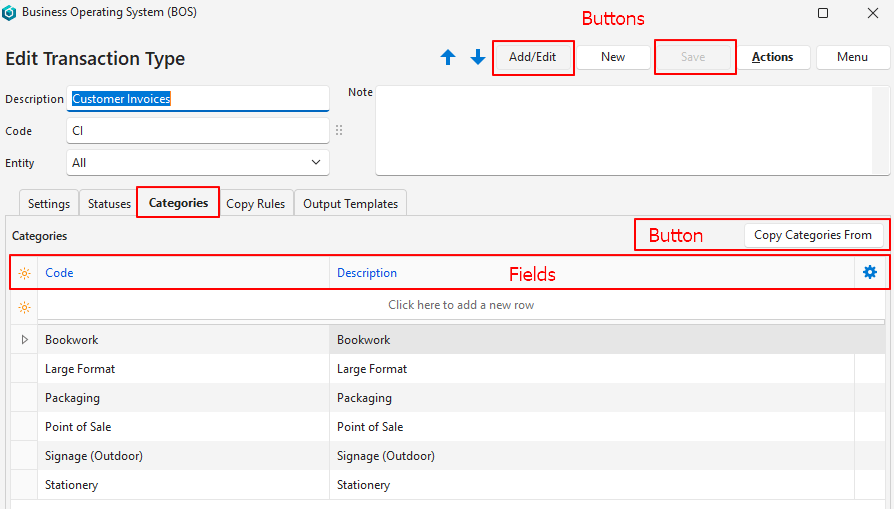
Buttons Explained
| Button | Description |
|---|---|
| Arrows | Navigates between Transaction Types (not categories). |
| Add/Edit | Edits the fields or adds a category. |
| New | Creates a new Transaction Type (not a category). |
| Save | Saves any changes (most changes are automatically saved). |
| Actions | Does not apply to the Categories tab. |
| Menu | Settings
|
| Copy Categories From | Provides a dropdown list of Transaction Types that have categories. Replaces the current Transaction Type’s categories with those of the selected Transaction Type if confirmed. Unavailable if any category of the current Transaction Type is used by a transaction. |
Fields Explained
| Field | Description |
|---|---|
| Field Chooser (*) | Add or remove columns. |
| ID | A system-generated number for the category. |
| Code | A short description of the category. |
| Description | The category’s description. |
 | A submenu used to Delete the category. |