
Transaction Types Output Tab
The Output Templates tab links form templates to the Transaction Type, so they are listed on Output (button) for its transactions (for example, Customer Invoices). This page describes the tab’s buttons and columns. For an overview of output, see Output Button.
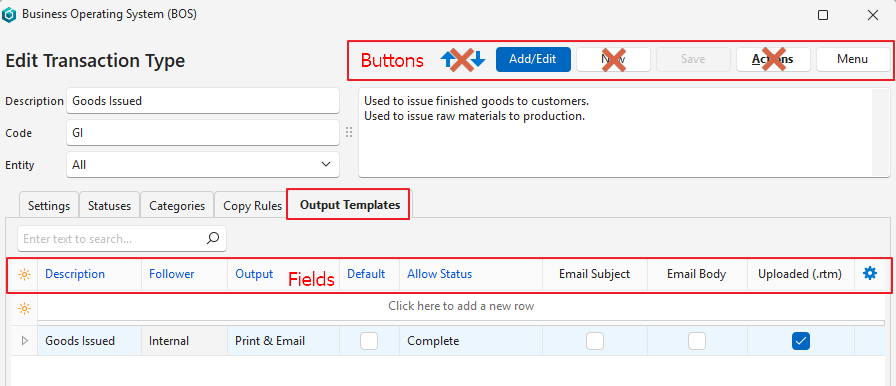
Buttons Explained
| Button | Description |
|---|---|
| Arrows | Does not apply to this tab. (Navigates between Transaction Types.) |
| Add/Edit | Lets you edit the Output Templates tab. |
| New | Does not apply to this tab. (Creates a new Transaction Type.) |
| Save | Saves any changes. |
| Actions | Does not apply to this tab. |
| Menu | Layout |
Fields Explained
Fields marked in blue (✎) can be edited.
| Field | Description |
|---|---|
| Field Chooser (*) | Add or remove columns. |
| ID | A system-generated number for the template entry. |
| Description | A description (name) of the template, entered by you. |
| Language | The template’s language. Transaction templates print the Category, Status and Credit Term in the transaction’s language, using the translations in the Language Editor. Text that has no translation is printed as it was entered. This translation is automatic: you do not need to change your templates. |
| Follower | Select who to email the template to:
|
| Output | Select an option:
The print options also enable an on-screen preview. The document can be printed from the preview, including to .pdf. |
| Default | Checkbox. If checked, clicking Output (button) runs this template. Select the other templates by clicking the arrow on Output (button). Can be checked for only one template. Only works with Print only or Email only output options. |
| Allow Status | Applies to transactions. Determines the transaction statuses in which output is allowed. |
| Entities | The entities selected for the template. The entities are selected using the submenu’s View/Edit Entities. |
| Email Subject | A checkbox. Automatically checked when an Email Subject is created through the context menu (right-click). |
| Email Body | A checkbox. Automatically checked when an Email Body is created through the context menu (right-click). |
| Uploaded (.rtm) | A checkbox. Automatically checked when a .rtm template is linked using the context menu (right-click). |
| Created | The date on which the entry was created. |
| Updated | The date on which the entry was updated. |
| Updated By | The user who updated the entry. |
 | A submenu with the following functions:
|