
Financial Reporting Dashboard Interface
- The dashboard shows transactions or accounts that need further processing.
- The left side shows a list of transactions that are either out of balance or have allocation errors.
- The right side shows the accrual accounts that need to be reconciled. The accrual accounts shown are those with the default Accrual in the Chart of Accounts.
- The dashboard has no date filter. When you open the Statement of Profit/Loss or the Statement of Financial Position from Menu (button) > Views, the Set date filter is Fin Year (Months) by default. The Trial Balance always uses Fin Year.
Example
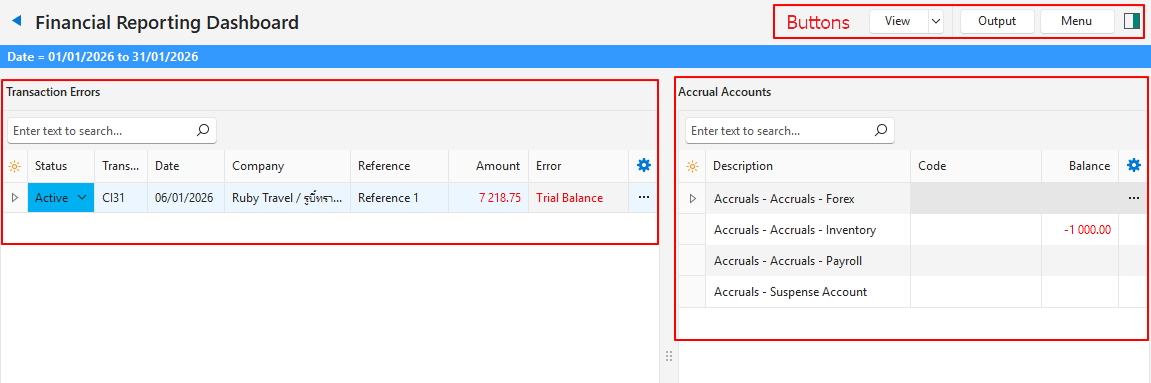
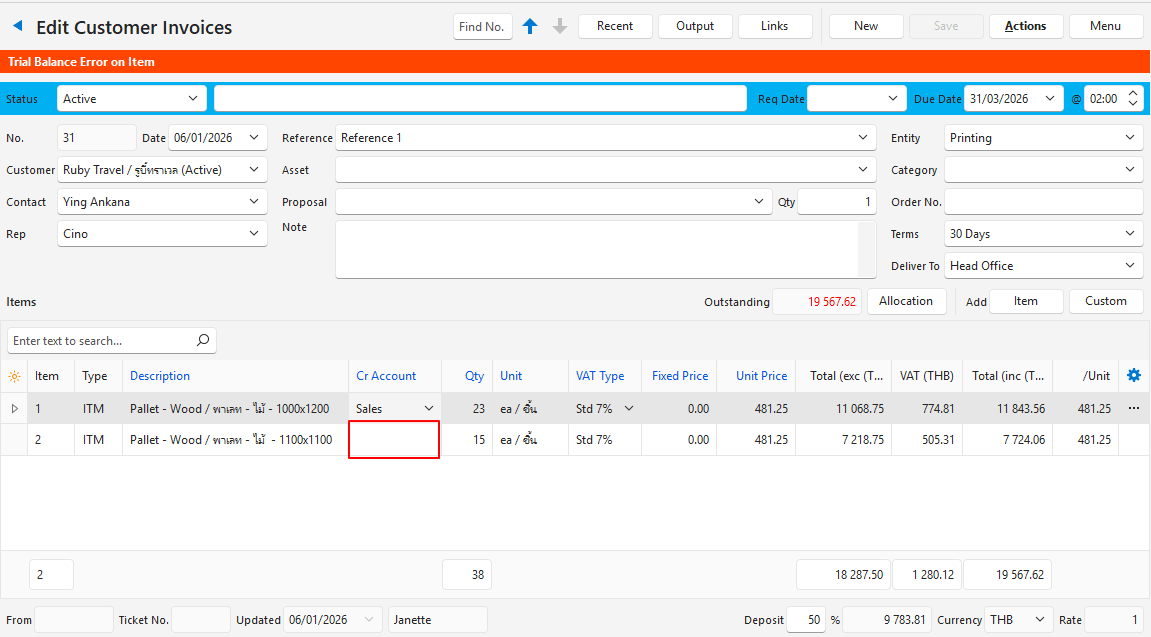
In the transaction causing the problem, the account to be credited is blank, so BOS does not know where to post the VAT-exclusive amount. It does, however, know where to post the VAT and Item 1’s transaction.
Buttons Explained
| Button | Description |
|---|---|
| View | Shows the entries that match the selected filters. |
| Arrow on View Button | Reset Data Filter: Resets all the data filters. |
| Output | Prints, previews or emails the output if Output Templates are set up for the module. Export (.xlsx): Select Transaction Errors or Accrual Accounts to export that list. Despite the caption, it can be saved in .xlsx, .htm or .csv format. |
| Menu | Views Settings
|
Transaction Errors: Fields Explained
| Field | Description |
|---|---|
| TransID | The system-generated number for the transaction. |
| Status | The status of the transaction. |
| Trans No. | The transaction number. |
| Date | The date of the transaction. |
| Company | The Customer or Supplier selected for the transaction. |
| Reference | The transaction’s reference. |
| Item | The sequence number for the item on the transaction. |
| Error Amount | The amount that cannot be posted to the ledger (e.g. the VAT-exclusive amount on an entry). |
| Date Created | The date on which the entry was created. |
| Date Updated | The date on which the entry was last updated. |
| Updated By | The user who last updated the entry. |
| Error | A description of the error (e.g. Trial Balance for an entry that is out of balance, or Allocation for an entry that is over-allocated). Transactions entered ahead of time are also listed, with the error Post-dated. |
 | A context menu (also opened by right-clicking the entry) with the following option:
|
Accrual Accounts: Fields Explained
| Field | Description |
|---|---|
| ID | The system-generated number for the entry. |
| Description | The accrual account’s description. |
| Code | The accrual account’s code. |
| Balance | The balance of the accrual account. |
| A context menu (also opened by right-clicking the entry) with the following option:
|