
Transaction Types List View
The Transaction Types list view lists all the created Transaction Types and their key information. Open a Transaction Type to set it up in the Transaction Types Edit View, which also lists the setup steps.
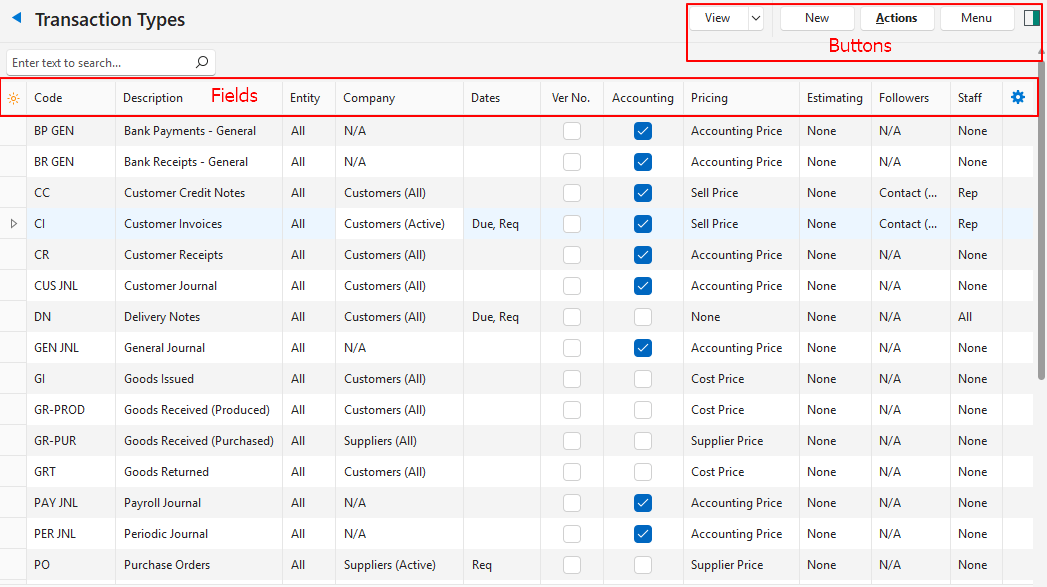
Buttons Explained
| Button | Description |
|---|---|
| View | Generates a list of Transaction Types. |
| Arrow on View (button) > Reset Data Filter | Resets the search criteria. |
| New | Creates a new Transaction Type. |
| Actions |
|
| Menu | Show Notes Settings
|
Fields Explained
| Field | Description |
|---|---|
| Field Chooser (*) | Add or remove columns. |
| ID | The system-generated number for the Transaction Type. |
| Code | The brief description for the Transaction Type. |
| Description | The Transaction Type’s description. |
| Entity | A list of entities the Transaction Type may be used for. |
| Company | Whether the Transaction Type applies to customers, suppliers or neither. |
| Dates | Whether due dates and required dates are enabled. |
| Ver No. | A checkbox. If checked, indicates that multiple versions with the same number are allowed (e.g. Quotations with minor variations). This setting cannot be changed once the Transaction Type contains an entry. |
| Accounting | A checkbox. If checked, indicates that the transaction is posted to the ledger. |
| Close-off Date | The Transaction Type’s Accounting > Close-off Date (read-only). Transactions dated on or before it are closed off. Set it in the Transaction Type settings, or for several types with Actions > Batch Update. |
| Proposals | A checkbox. Checked if proposals are used. |
| Pricing | The pricing option selected for the Transaction Type. The options are:
|
| VAT Type | The VAT Type selected for the Transaction Type. |
| Estimating | The estimating option selected for the Transaction Type. The options are:
|
| Resolve | The resolve options selected for the Transaction Type. |
| Followers | A list of all the Follower types chosen for the Transaction Type, or N/A. |
| Staff | Shows the Staff setting. The options are:
|
| Created | The date on which the entry was created. |
| Updated | The date on which the entry was updated. |
| Updated By | The user who updated the entry. |
 | A submenu, which can also be accessed by right-clicking the entry, with the following functions:
|