
User Access by Module
User Access by Module lists the users who have access to one module, with their access rights, so you can view and edit them for all users at once. You open it from the Users module, which only Admin users can open (see Understanding User Access and Settings). User access can also be set from a module’s own Menu (button) (see User Access Tutorials).
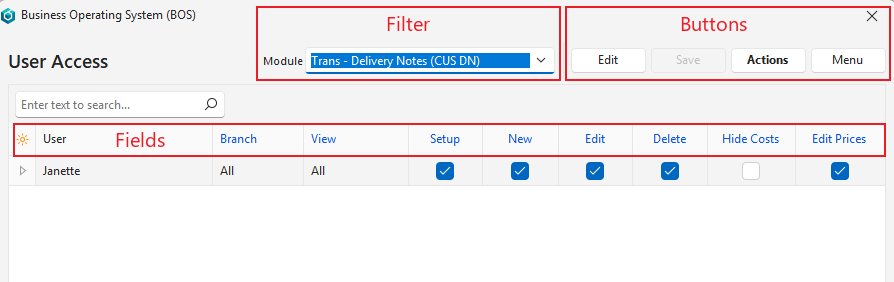
Buttons Explained
| Button | Description |
|---|---|
| Edit | Edits the entry. |
| Save | Saves any changes. |
| Actions | Lets you change multiple records that you can select using Ctrl + left-click. The options are:
|
| Delete | Deletes the selected user’s access to the module, after you confirm it. |
| Menu |
|
Filter Explained
| Filter | Description |
|---|---|
| Module | Select a module from the dropdown list of available modules. |
Fields Explained
Fields marked in blue (✎) can be edited.
| Field | Description |
|---|---|
| Field Chooser (*) | Add or remove columns. |
| ID | A system-generated number for the entry. |
| User ID | The user’s system-generated number. |
| User | The user’s name. |
| Entity | Hidden for modules that do not use entities (for example, contacts, items and calendars). Links users to all or specific entities: select All or an entity. Cancelled entities are not listed. For a Transaction Type or Service Type, the list and the column caption follow the type’s Enable Entities setting:
Note: When the Enable Entities setting of a Transaction Type or Service Type is changed, this field is reset to All for every user of that type, because the previous entity is no longer the right kind. |
| View | Access to view the records. The options are:
|
| Setup | Users have access to the settings. |
| New | Users may create new transactions. However, copying transactions has its own rules. Users without New permission but with copy permission can create new transactions by copying existing transactions. |
| Edit | Users may edit existing transactions. Users with rights to create transactions must also have edit access. |
| Delete | Users may delete existing transactions. |
| Hide Costs | Transaction Types only: the column is hidden for other modules. If checked, the cost, markup and profit columns are hidden from the user in the transaction list and on the items. Unchecked by default. The hidden columns are:
Applies only to Transaction Types with the Pricing setting Sell Price or Sell Price (Any Currency).
|
| Edit Prices | Transaction Types only: the column is hidden for other modules. If checked (the default), the user can change the prices on the transaction’s items. If unchecked, these item columns are not editable and their headers are no longer blue:
If unchecked, Adj%, MU% and VAT are also removed from the items’ Batch Update. Hide Costs and Edit Prices are copied with the rest of the user access when you copy users or access, and when a Transaction Type is copied. |
| Created | The date on which the entry was created. |
| Updated | The date on which the entry was updated. |
| Updated By | The user who updated the entry. |