
Recycle Bin
The following records are not permanently deleted. Instead, they are moved to a Recycle Bin from where they can be restored or permanently deleted:
- Assets
- Contacts
- Custom Reports
- Items
- Proposals
- Services
- Transactions
- Users
All other records are deleted permanently, after you confirm the deletion.
Deleted users are only listed when the Module filter is set to Users (not All). If a user is permanently deleted, you can no longer see the changelogs and audits linked to that user.
Clear the Recycle Bin regularly.
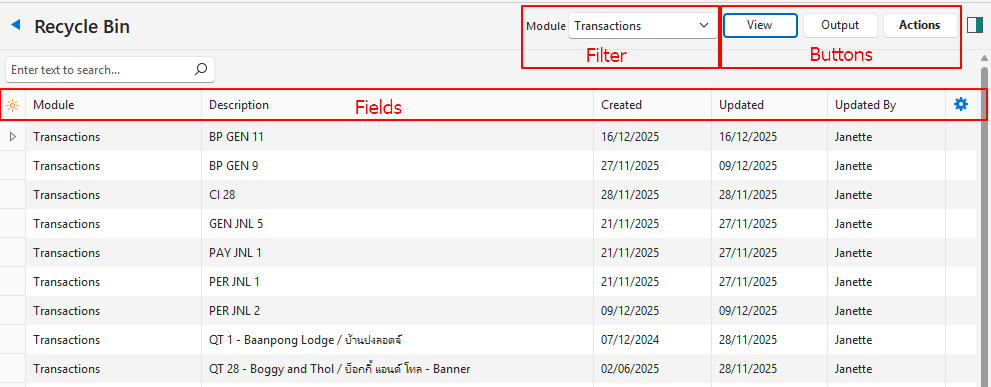
Buttons Explained
| Button | Description |
|---|---|
| View | Generates a list of deleted records. |
| Output | Export: Exports the list in .xlsx, .htm or .csv format. |
| Actions |
|
Filter Explained
| Filter | Description |
|---|---|
| Module | Select one of these options from the dropdown list:
|
Fields Explained
| Field | Description |
|---|---|
| Field Chooser (*) | Add or remove columns. |
| ID | A system-generated number for the original record. |
| Module | The module from which the record was deleted. |
| Description | The description of the item or transaction. |
| Created | The date on which the entry was created. |
| Updated | The date on which the entry was deleted (moved to the Recycle Bin). |
| Updated By | The user who deleted the record. |
 | A submenu with Restore and Delete for the entry. |