
VAT Types Interface
- QuickEasy BOS has features to expertly manage most countries’ VAT or GST requirements.
- The software is also suitable for organisations that are not registered for either VAT or GST.
- Organisations can create an unlimited number of VAT or GST Types (e.g. VAT Standard, Zero Rated, Exempt) and allocate a percentage to each.
- Default VAT/GST Types are chosen when creating Transaction Types, including whether the VAT or GST is considered Input or Output. However, these defaults can be edited when transactions are entered (e.g. if the supplier is not registered for VAT).
- The documentation refers to VAT, but the concepts are the same for GST.
Info
- VAT Types are selected when entering transactions.
- The applicable percentage is removed from the transaction and posted to the VAT Control account.
- All income transactions should have a VAT Type so that turnover balances to the declared VAT for sales and services (Output VAT).
- No VAT should be selected for Expenses or Purchases where the supplier is not registered for VAT or does not charge you VAT (e.g. zero-rated foodstuffs and petrol in South Africa). It should also be selected where you are not allowed to claim VAT Input credits (e.g. entertainment and refreshments in South Africa).
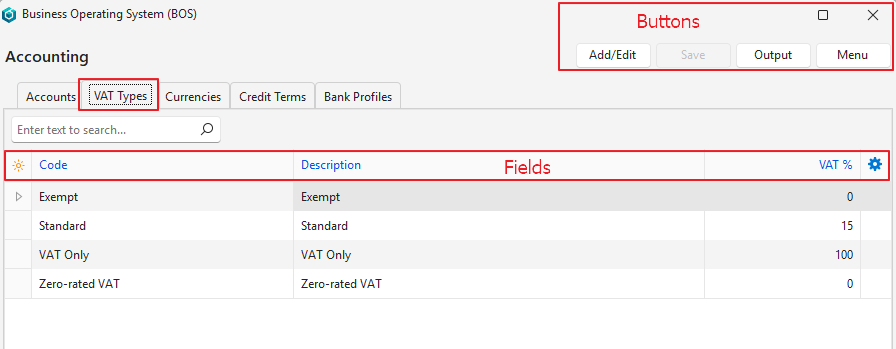
Buttons Explained
| Button | Description |
|---|---|
| Add/Edit | Adds VAT Types or edits the existing ones. |
| Save | Saves any changes. |
| Output | Export: Exports the list in .xlsx, .htm or .csv format. |
| Menu | Layout |
Fields Explained
Info
Fields marked in blue (✎) can be edited.
| Field | Description |
|---|---|
| Field Chooser (*) | Add or remove columns. |
| Code | A short description of the VAT or GST Type. |
| Description | A longer description of the VAT or GST Type. |
| VAT % | The VAT percentage of the VAT Type. |
| CGST% | The percentage of Central GST (CGST) imposed by the Central Government of India. |
| SGST% | The percentage of State GST (SGST) imposed by the Indian state. |
| IGST% | The percentage of Integrated GST (IGST) applicable to inter-state or inter-union transactions in India. |
| Created | The date on which the entry was created. |
| Updated | The date on which the entry was last updated. |
| Updated By | The user who last updated the entry. |
 | A context menu (also opened by right-clicking an entry) with Delete, which deletes the VAT Type if it is unused. |