
Entities List View
The Entities list view lists all the entities, in a grid or in a tree that shows their hierarchy. For the types of entity and how they nest, see Entity Types.
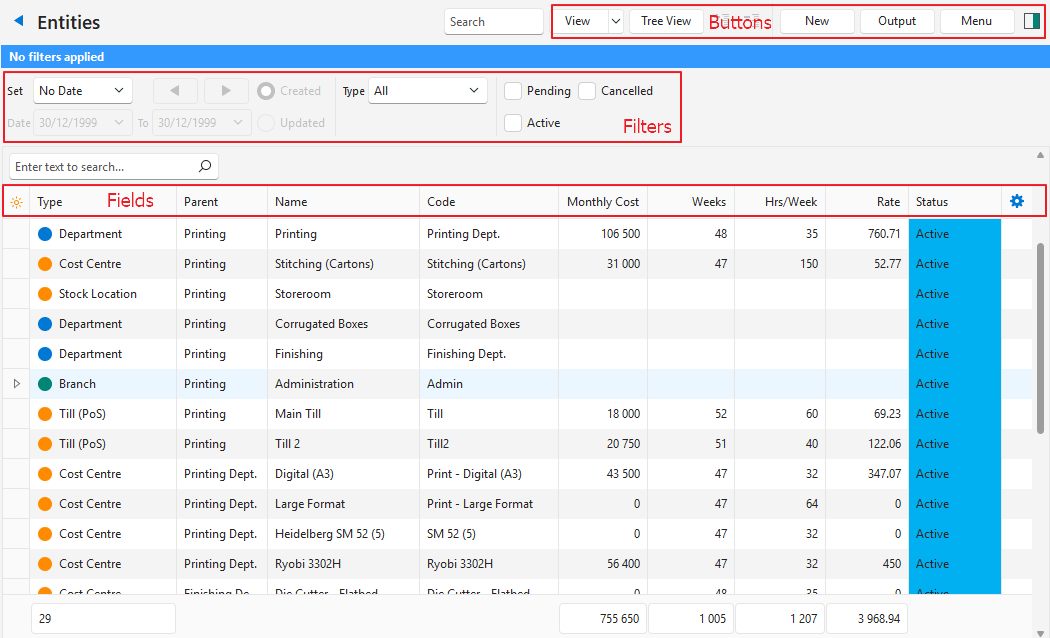
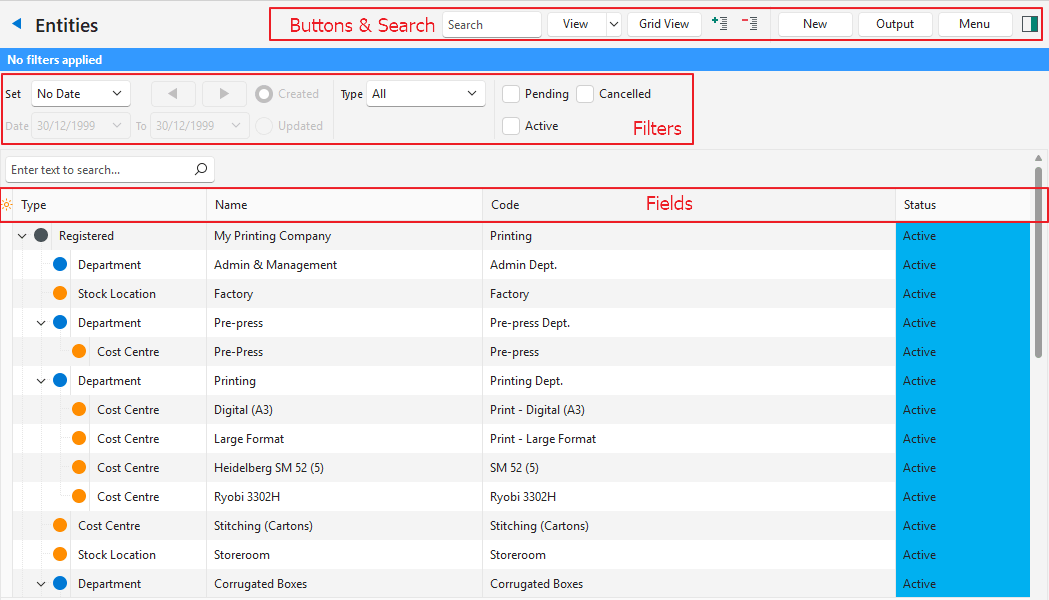
Buttons Explained
| Button | Description |
|---|---|
| View | Generates a list of entities. |
| Arrow on View button: Reset Data Filter | Resets the selected filters. |
| Tree View / Grid View | Applies to Entities view. Toggles between viewing entities as a grid (Grid View) or an indented list (Tree View). |
| + – | Expands or collapses the tree view. |
| New |
|
| Actions | Lets you change multiple records, selected with their checkboxes. Entities View:
Staff View:
A batch update needs the Batch Updates user setting. |
| Output | Export: Exports the list in .xlsx, .htm or .csv format. |
| Menu | Views
Settings
|
Filters Explained
| Filter | Description |
|---|---|
| Date | Selects a date option (e.g. No Date, This Week). |
| Arrows | Adjusts the dates in the direction of the arrow. |
| Date Fields | Lets you further refine the dates. |
| Created | A radio button. If selected, filters the records to show entities created on the specified date. |
| Updated | A radio button. If selected, filters the records to show entities updated on the specified date. |
| Type | Select All or a specific Entity Type. |
| Status | Checkboxes for the main Status Groups that limit the display to the checked statuses. If none of the boxes are checked, all the records appear. |
Fields Explained: Entities
| Field | Description |
|---|---|
| Field Chooser (*) | Add or remove columns. |
| ID | The system-generated number for the entry. |
| Parent ID | The system-generated number for the parent. Tree view only. |
| Status | The status of the entry. |
| Parent | The parent entity. Grid view only. |
| Type | The type of entity. |
| Order ID | A system-generated number for the entity. |
| Name | The name of the entity. |
| Code | The abbreviation of the entity’s name (code). |
| Cost Centres | The entity’s linked Cost Centres. Grid view only. |
| Inventory Account | The stock location’s Inventory Account (see Entities Edit View, Accounting tab). Grid view only. |
| Monthly Cost | The fixed monthly cost. Grid view only. |
| Weeks | The number of work weeks in a year. Grid view only. |
| Hrs/Week | The number of hours worked in a week. Grid view only. |
| Rate | The hourly rate. Grid view only. |
| Created | The date on which the entity was created. |
| Updated | The date on which the entity was updated. |
| Updated By | The user who updated the entity. |
 | A submenu (also opened by right-clicking the entry) with these options:
Grid view only. |
Fields Explained: Staff View
The Staff view lists the contacts that have the Staff attribute set. The view uses the Staff attributes only: for a contact that is both staff and a customer or supplier, the Status and Sales Rep come from the Staff attributes, not the Customer or Supplier attributes.
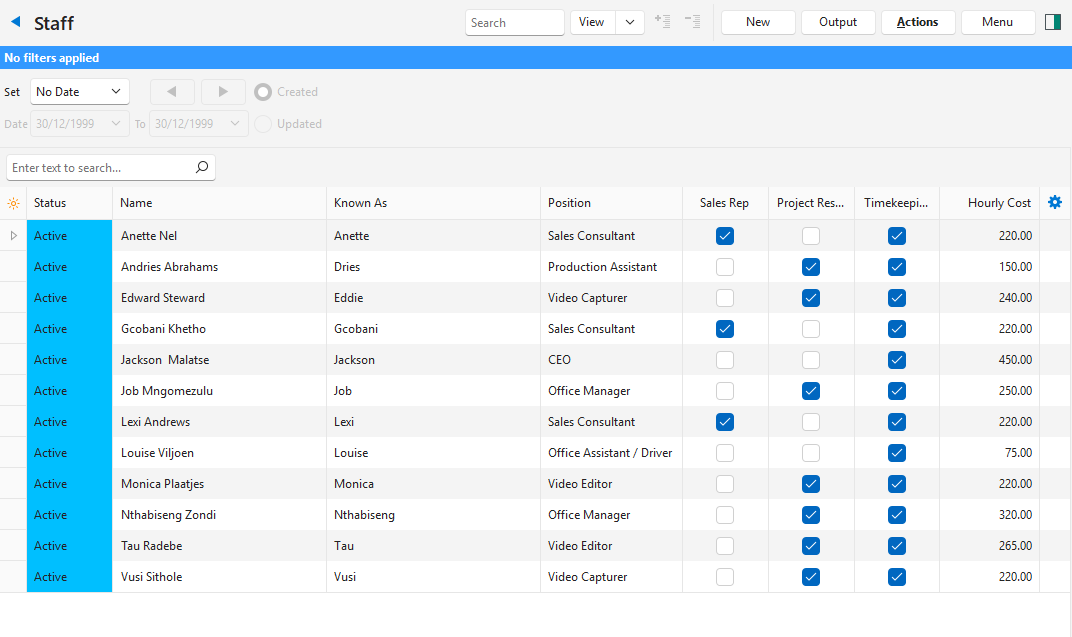
| Field | Description |
|---|---|
| Field Chooser (*) | Add or remove columns. |
| ID | A system-generated number for the entry. |
| Status | The staff member’s status in the Staff attribute set:
|
| Name | The staff member’s name and surname. |
| Known As | The name by which the person is known. |
| ID No | The staff member’s identity number. |
| Title | The staff member’s title (e.g. Mr, Dr, Ms). |
| Forenames | The first name of the staff member. |
| Surname | The surname of the staff member. |
| Telephone | The staff member’s telephone number. |
| Mobile | The staff member’s mobile number. |
| The staff member’s email address. | |
| Website | The staff member’s website. |
| Position | The staff member’s Position. |
| Sales Rep | Whether the staff member appears on the sales rep dropdown lists. A customer is not added to the Sales Rep lists (for example, Customer Sales Rep and Budget tiers) only because its Customer Sales Rep attribute is set. |
| Project Resource | Whether projects can be allocated to the staff member. |
| Timekeeping Resource | Whether the staff member can log time. |
| Hourly Cost | The staff member’s hourly cost. |
| Created | The date on which the entry was created. |
| Updated | The date on which the entry was updated. |
| Updated By | The user who updated the entry. |
| A submenu (also opened by right-clicking the entry) with these options:
|