
Data Filters
- Data Filters extract specific data from a report that contains all the available data. Filters are available for text, numbers, dates and other types of data.
- The selected data filters are activated once View (button) is clicked.
- Every module, report and transaction has its own Data Filters.
- Data filters consist of:
- Dropdown lists: You can select an entry from the dropdown list. If All is available, using the filter is optional. If there is no All option, you must select an entry from the dropdown list.
- Radio buttons: Radio buttons apply criteria to the list based on the button that is selected.
- Checkboxes: The entries that are checked are included. All the options appear if all or none of the checkboxes are checked.
- The example below shows the standard data filters for Quotations.
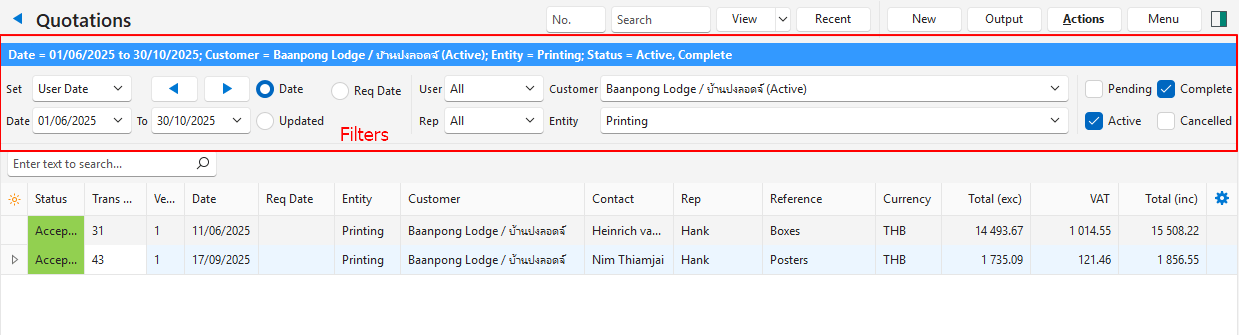
| Field | Description |
|---|---|
| Blue bar | Displays a summary of the selected filters. |
| Set | Sets a specific time frame such as Today, This Month, This Year. |
| Date | Filters the data between a start and end date. |
| Arrows | Arrows adjust the date in the direction of the arrow. |
| User | Filters the data to only show records that involve the selected user. |
| Rep | Filters the data to only show records that involve the selected rep. |
| Customer | Filters the data to only show records that involve the selected customer. |
| Entity | Filters the data to only show records that involve the selected registered entity. |
| Status | Checkboxes to filter the records based on their Status Groups such as Pending, Active, Complete and Cancelled. Multiple checkboxes may be checked. If no checkboxes are checked, all the statuses are included. |
| Search Bar (below the filters) | Provides specific search criteria for transactions. Only active after View (button) is clicked. |