
Search Functions
Info
QuickEasy BOS includes built-in search functions for you to find records quickly.
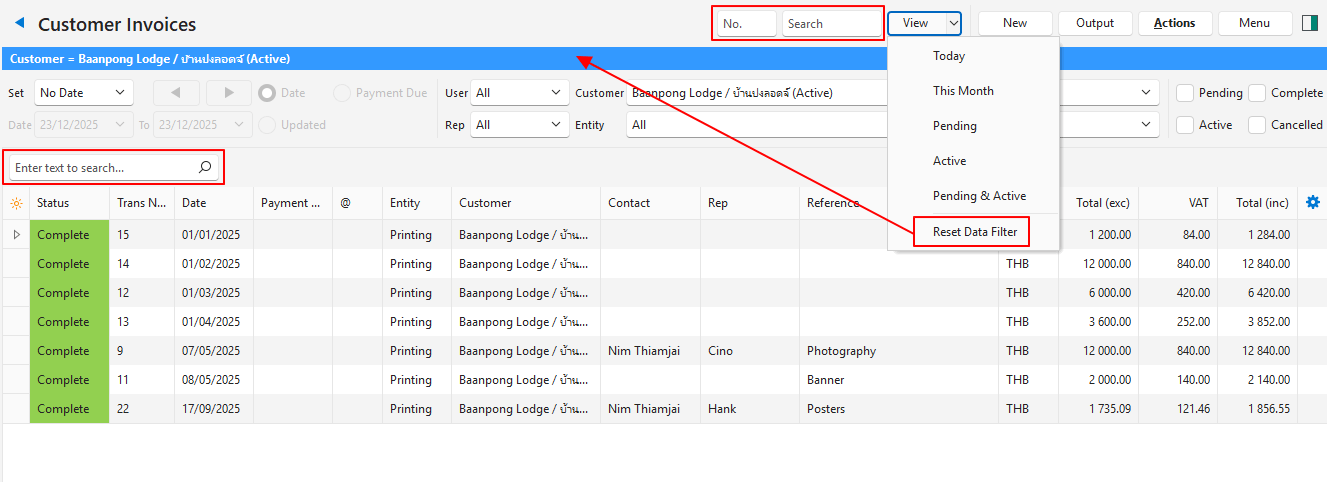
Search Fields (Top Menu Bar)
| Field | Description |
|---|---|
| No. | Enter the document number and click View (button). |
| Search | Enter a word or phrase and press Enter. Only searches the Reference field of the entries. |
Search Block (Above Columns)
Info
The search block is only visible when data appears (after View (button) is clicked).
It works as a filter and shows only the records that include the word or phrase entered in the search block.
| Field | Description |
|---|---|
| Search Bar | Enter a word or phrase. Searches every field for the word or phrase. Click the X to clear the phrase. The X only appears after you enter a word. |
Resetting Search Terms and Filters
| Field | Description |
|---|---|
| Arrow on View (button) > Reset Data Filter | Resets all the search fields and filters. |