
Credit Terms
Credit terms set when payment is due: when customers must pay you and when you must pay your suppliers (e.g. 30 days from the statement date).
Credit terms are a lookup list that you create. Customers and suppliers use the same list. A setting lets you use the credit terms to set due or payment dates on transactions automatically.
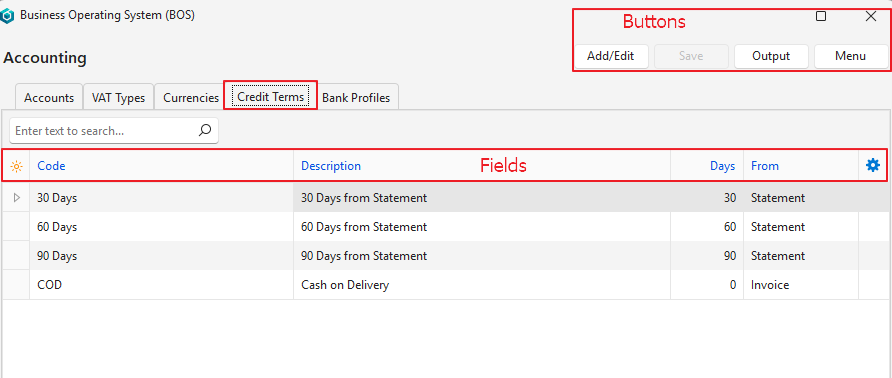
Buttons Explained
| Button | Description |
|---|---|
| Add/Edit | Lets you add and edit entries. |
| Save | Saves any changes. |
| Output | Export: Exports the credit terms in .xlsx, .htm or .csv format. |
| Menu | Layout |
Fields Explained
Info
Fields marked in blue (✎) can be edited.
| Field | Description |
|---|---|
| Field Chooser (*) | Add or remove columns. |
| ID | The system-generated number for the entry. |
| Code | The code for the credit term. The code should be a meaningful abbreviation of the full description (e.g. 30D). |
| Description | A description of the credit term (e.g. 30 Days from Statement). |
| Days | The number of days after the invoice or statement date until payment is due. |
| From | Select:
|
 | A submenu with an option to Delete the credit term. A credit term that is used on a transaction cannot be deleted. |