
Footers
Info
When entering or viewing data, a summary appears at the bottom of the screen. This summary is the footer.
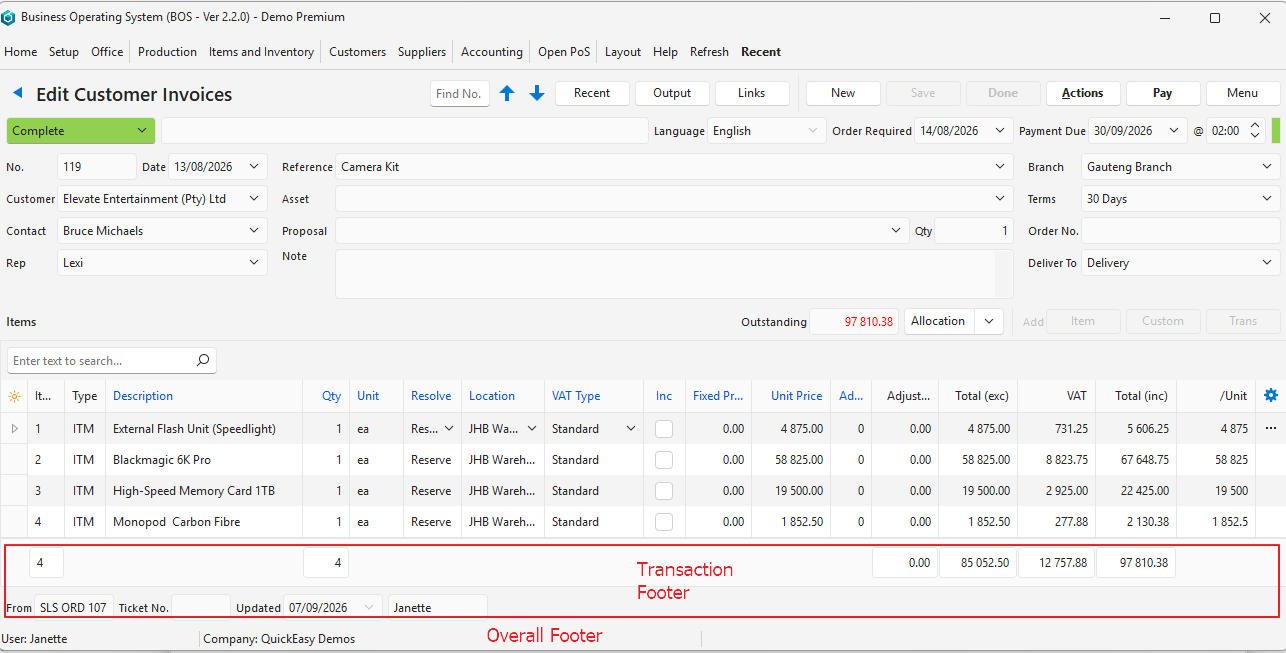
Transaction Footer
| Field | Description |
|---|---|
| Item Columns | A count of the number of items. |
| Quantity Columns | A count of all the quantities. |
| Calculated Value Columns | Columns with calculated totals (e.g. Total (exc), Total (inc)) are added, and the totals appear at the bottom of the screen. |
| Deposit | Transactions on which deposits apply show the deposit percentage and amount. |
| Source Transaction Numbers (From) | If the transaction was created from another transaction, a code for the Transaction Type and the document number appear. |
| Service Ticket Numbers (Ticket No.) | If the transaction is linked to a service ticket, the name of the service and ticket number appear (e.g. Sales 2). |
| Updated | The date on which the transaction was last updated. |
| User | The name of the user who last updated the transaction. |
Overall Footer
| Field | Description |
|---|---|
| User | The name of the user who is logged in. |
| Company | The name of the company (licensee of the software). |