
Supplier Detailed Ledger
The Supplier Detailed Ledger shows all the transactions with a specific supplier in the selected period, with a running balance.
In QuickEasy BOS, this ledger is linked to the Supplier Age Analysis and is accessed from there.
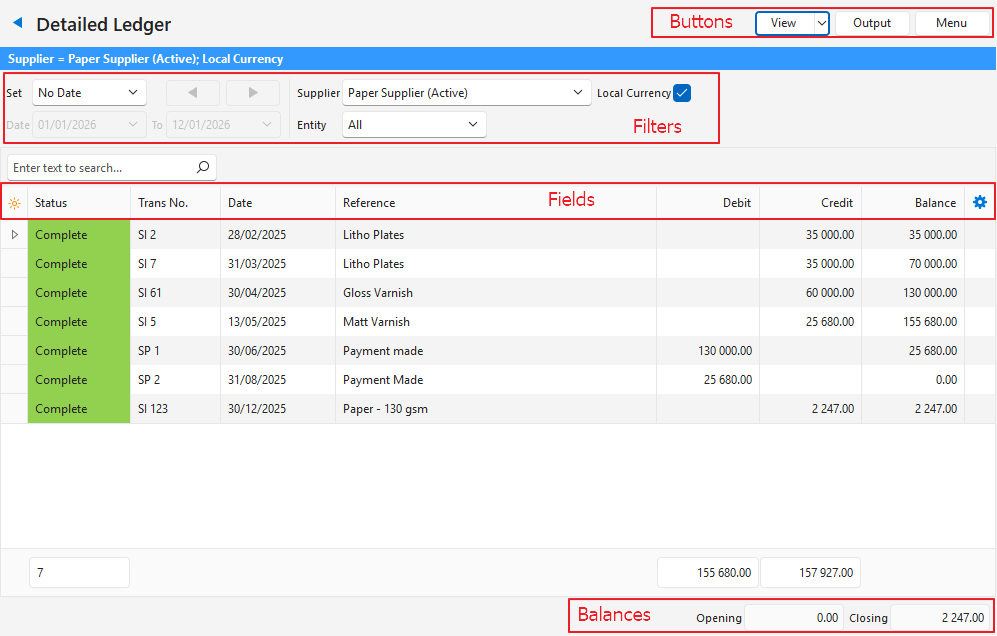
Buttons Explained
| Button | Description |
|---|---|
| View | Shows the entries that match the selected filters. |
| Arrow on View Button | Reset Data Filter: Resets all the data filters. |
| Output |
|
| Menu | Views
Settings |
Filters Explained
| Filter | Description |
|---|---|
| Set | Select a date option from the dropdown list:
|
| Navigational Arrows | Adjusts the date forwards or backwards. |
| Date … to … | Enter your own dates. |
| Entity | Select an entity from the dropdown list. |
| Supplier | Select a supplier from the dropdown list. If none is selected, the message “Please select a Supplier.” appears when you click View (button). |
| Local Currency | Checkbox. If checked, the ledger shows the local currency. If unchecked, it shows the supplier’s currency. Applies to suppliers that invoice in foreign currencies. |
Fields Explained
| Field | Description |
|---|---|
| Field Chooser (*) | Add or remove columns. |
| Trans ID | The system-generated number for the transaction. |
| Status | The colour-coded status of the transaction. |
| Trans | The Transaction Type’s code (e.g. SI for Supplier Invoice). |
| No. | The transaction’s number. |
| Trans No. | The Transaction Type’s code (e.g. SI for Supplier Invoice) and number. |
| Date | The date of the transaction. |
| Entity (Reg) | The registered entity to which the transaction is allocated. |
| Entity | The entity selected for the transaction, which can be a till, branch or registered entity. |
| Reference | The reference entered on the transaction. |
| Currency | The transaction’s currency. Applies only to suppliers that invoice in foreign currencies. |
| Debit | The amount that was debited for the specific entry. |
| Credit | The amount that was credited for the specific entry. |
| Allocated | The amount that is allocated (e.g. Supplier Payments allocated to Supplier Invoices). |
| Outstanding | The amount that is not allocated. |
| Balance | The running total (balance) on the account. |
 | A context menu (also opened by right-clicking the entry) with the following options:
|
Footer Explained
| Field | Description |
|---|---|
| Opening | The opening balance at the start of the selected period. |
| Closing | The closing balance at the end of the selected period. |